Admin-UI
The purpose of admin-ui is to facilitate collaborative development, centralized control over development and deployment automation, extending the business functionalities with a low code development environment and support with the media and configuration controls.
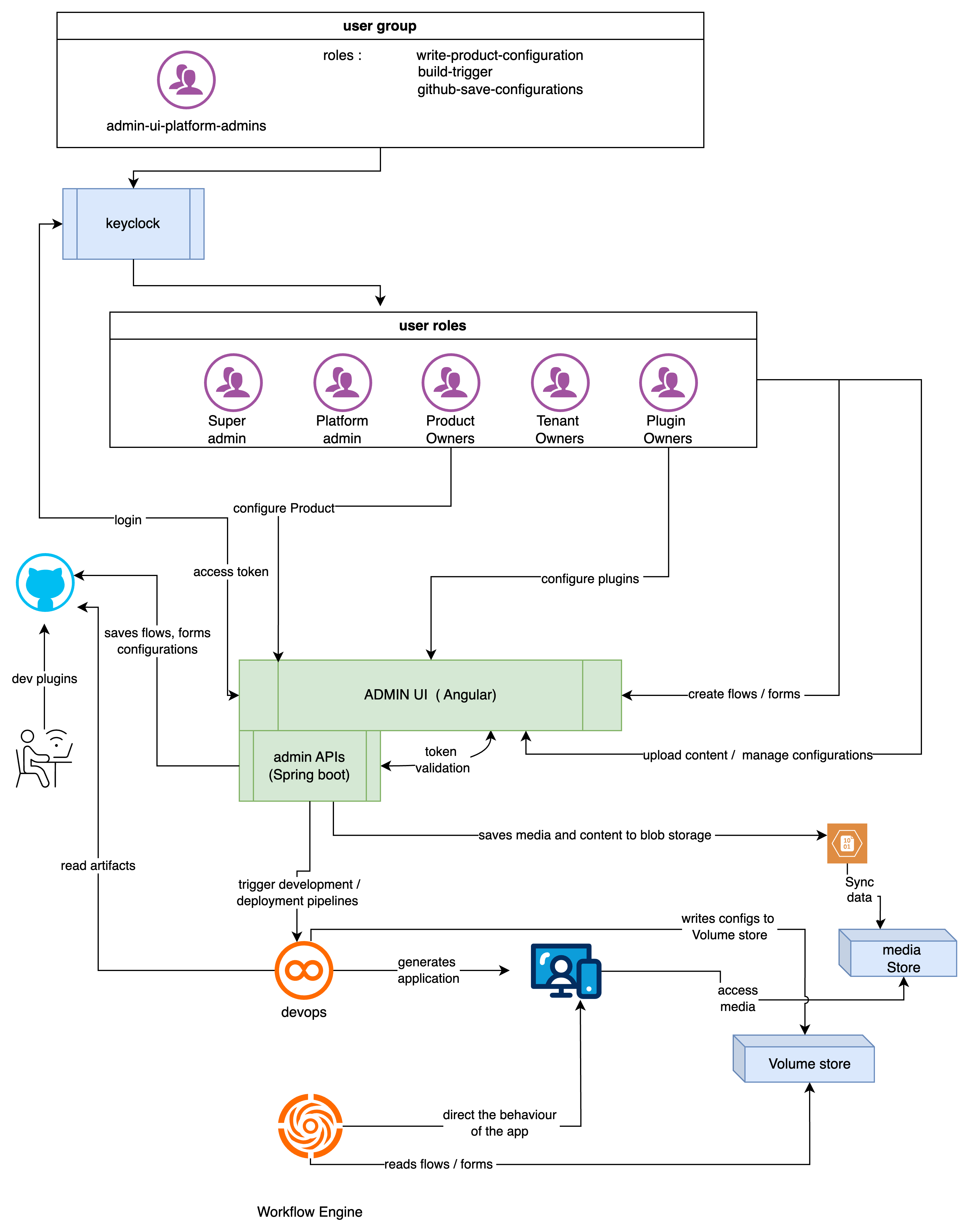
On a high-level admin-ui will do 4 things
- Configure products
- Configure plugins
- Flows and forms
- Media and configurations
Key Functionalities
-
Product and Plugin Management:
• Create intuitive interfaces for product and plugin configuration, allowing users to easily manage settings and dependencies. • Implement a duplication feature for products to streamline the creation of similar configurations across different environments.
-
Workflow and Approval Management:
• Initially, use email notifications for approval workflows, with plans to automate this process in future iterations. • Define clear workflows for triggering builds and managing plugin updates, ensuring accountability and traceability.
-
Media and Configuration Management:
• Ensure robust file upload mechanisms with security checks to prevent malicious uploads. • Provide a user-friendly interface for managing media files and configurations, with clear feedback on upload statuses.
-
BPMN Flow and Form Editors:
• Implement drag-and-drop functionality for creating BPMN flows and forms, making it easy for users to design workflows visually. • Ensure that both editors support versioning and integration with Git for easy management of changes.