Consent System Diagrams
Architecture Diagram
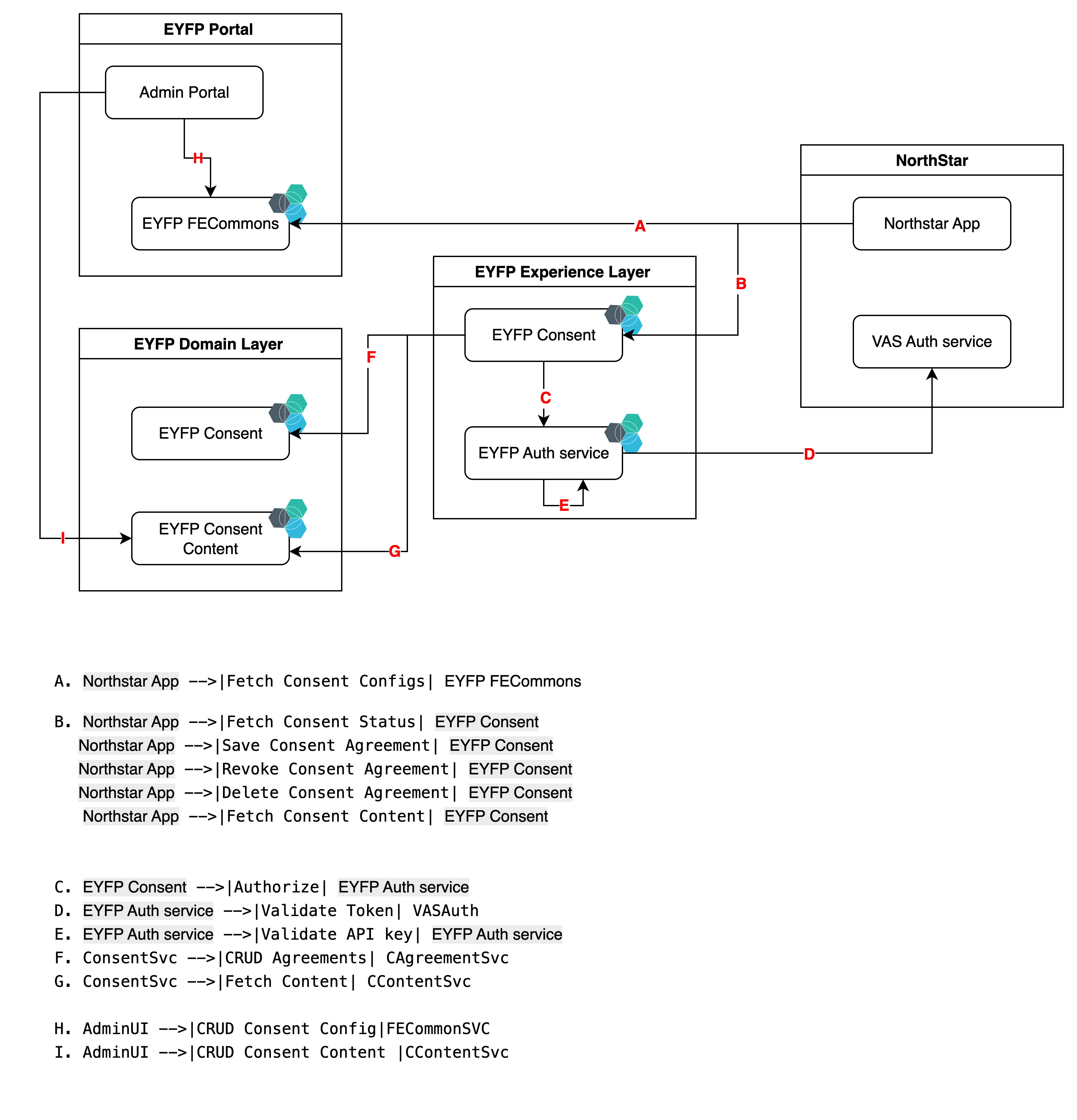
Sequence Diagram
Class Diagram
Flow Description
User Consent Status Flow
- Northstar App fetches required consents from consent configurations
- Northstar App requests the EYFP Consent Service for user consent agreements
- EYFP Consent Service authorizes the request through EYFP Auth Service
- EYFP Auth Service validates the token with VAS Auth Service
- EYFP Consent Service fetches user's consent agreements from EYFP Consent Agreement Service
- Each ConsentAgreement object provides its status through the getStatus() method (Granted, Not granted, Revoked, Deleted, Outdated)
- The consent agreements with computed status are returned to the Northstar App
Consent Content Flow
- If user has not given consent or revoked it, Northstar App fetches versioned consent content
- EYFP Consent Service authorizes the request using the EYFP Auth Service
- EYFP Auth Service validates the API key internally
- EYFP Consent Service fetches the latest consent content from EYFP Consent Content Service
- EYFP Consent Service returns the content to Northstar App for display to the user
where to keep the consent config
we will keep the config in the product config area , and will be exposed as a seperate api via FECommons API.
Consent Status Logic
The consent status is computed dynamically from the ConsentAgreement properties using the getStatus() method. This eliminates the need for a separate status table and ensures data consistency. The status determination follows this priority order:
Status Computation Rules
| Status | Condition | Description | Storage Decision |
|---|---|---|---|
| DELETED | isDeleted = true | User's consent record has been permanently deleted (GDPR compliance) | Stored (for audit trail) |
| REVOKED | isRevoked = true AND isDeleted = false | User has explicitly withdrawn their consent | Stored (explicit action) |
| NOT_GRANTED | granted = false AND isRevoked = false AND isDeleted = false | User has explicitly declined the consent | Stored only for explicit declines |
| NEVER_ASKED | No record exists | User has never been presented with this consent | Not stored (no record) |
| OUTDATED | granted = true AND isRevoked = false AND isDeleted = false AND version < latestVersion | User granted consent but for an older version - requires re-consent | Stored (shows consent history) |
| GRANTED | granted = true AND isRevoked = false AND isDeleted = false AND version = latestVersion | User has granted consent for the current version | Stored (active consent) |
Storage Strategy
What gets stored in ConsentAgreement table:
-
✅ Explicit Grant: User clicks "Accept" →
granted = true -
✅ Explicit Decline: User clicks "Decline" →
granted = false -
✅ Revocation: User withdraws consent →
isRevoked = true -
✅ Deletion: GDPR deletion request →
isDeleted = true -
❌ Never Asked: No user interaction → No record created
-
isActive(): Returnstrueif status isGRANTED(consent is valid and current) -
isOutdated(latestVersion): Returnstrueif user granted consent but for an older version
Business Rules
- Deletion takes precedence: Once
isDeleted = true, status is alwaysDELETEDregardless of other fields - Revocation overrides grant: If
isRevoked = true, status isREVOKEDeven ifgranted = true - Version checking: Only applies when consent is granted and not revoked/deleted
- Re-consent requirement:
OUTDATEDstatus indicates user must provide consent again for the new version - Automatic revocation on upgrade: When a user grants consent to a new version, the old version agreement is automatically revoked (
isRevoked = true) to maintain clean consent history
Example Scenarios
| granted | isRevoked | isDeleted | version | latestVersion | Record Exists | Status | Action Required |
|---|---|---|---|---|---|---|---|
| true | false | false | "1.0" | "1.0" | Yes | GRANTED | None |
| true | false | false | "1.0" | "2.0" | Yes | OUTDATED | Re-consent for v2.0 |
| false | false | false | "1.0" | "1.0" | Yes | NOT_GRANTED | User explicitly declined |
| true | true | false | "1.0" | "1.0" | Yes | REVOKED | User withdrew consent |
| true | false | true | "1.0" | "1.0" | Yes | DELETED | Cannot process - data deleted |
| N/A | N/A | N/A | N/A | "1.0" | No | NEVER_ASKED | Present consent for first time |
Key Insight: The difference between NOT_GRANTED and NEVER_ASKED is crucial:
- NOT_GRANTED: User saw the consent and explicitly clicked "Decline" - we store this decision
- NEVER_ASKED: User has never been presented with this consent - no database record exists
- OUTDATED: User previously agreed to v1.0, but now v2.0 is available - they need to see and agree to the new version
Version Upgrade Process
When a user with OUTDATED status agrees to a new consent version:
-
Old Agreement Handling: The previous agreement is automatically revoked:
UPDATE consent_agreement
SET isRevoked = true,
    revokedTimestamp = NOW(),
    revokedReason = 'VERSION_UPGRADE'
WHERE userId = ? AND consentId = ? AND version = 'old_version' -
New Agreement Creation: A new agreement record is created:
INSERT INTO consent_agreement
(userId, consentId, granted, version, contentversion, timestamp, consentContent, tenantID)
VALUES (?, ?, true, 'new_version', ?, NOW(), ?, ?) -
Audit Trail: Both the revocation and new agreement are logged for compliance
Core Consent System Requirements
Consent Agreements
- Definition: A consent "agreement" is created when a user accepts or rejects a consent request
- Support Tools: Consent management services must allow support tools to create and process consents without requiring a user token
- Audit Trail: All agreements must be stored in a logged, timestamped, audit-proof, and immutable manner
- Digital Signature: Each agreement must include a cryptographic signature or hash that:
- Verifies the specific content the user agreed to
- Proves if consent content has been modified after agreement
- Is cryptographically immutable
Versioning System
Consent content in EYFP is managed using a two-level versioning system:
1. Consent Version
- Represents major changes to consent conditions
- Managed through the admin portal
- When a user hasn't granted consent or has granted an earlier version:
- The latest consent version is presented
- Upon agreement, this version is recorded
- A new consent version always requires re-consent from users
2. Content Version
- Handles minor changes within a consent version
- Characteristics:
- Increments with small text or formatting changes
- Exact content shown to user is preserved with the agreement
- Users always see the latest content version of a given consent
- Important: Content version changes do not require re-consent if a user has already agreed to the parent consent version
- Only users who haven't yet granted consent will see updated content versions
Regular Error Handling for the API
Success Codes
| Code | Description | Example Usage |
|---|---|---|
| 200 OK | Successful request. The server has fulfilled the request and is returning the requested data. | GET user consents, PUT/update consent status |
| 201 Created | The request has been fulfilled, and a new resource has been created. The response typically includes a Location header pointing to the newly created resource. | POST new consent agreement |
| 204 No Content | The request was successful, but there is no response body to return. | DELETE consent record, successful revocation |
Error Codes
| Code | Description | Example in Consent System |
|---|---|---|
| 400 Bad Request | The client's request is malformed, invalid, or cannot be processed. This includes validation errors, missing required fields, or invalid data formats. | Invalid consent ID format, missing required user ID |
| 401 Unauthorized | Authentication is required but was not provided or was invalid. The client must authenticate to access the resource. | Invalid or expired auth token when accessing consent services |
| 403 Forbidden | The client is authenticated but does not have permission to access the requested resource or perform the requested action. | User attempting to access another user's consent records |
| 404 Not Found | The requested resource does not exist on the server. | Consent ID not found, user has no consent records |
| 405 Method Not Allowed | The HTTP method used is not supported for the requested resource. | Using DELETE on an endpoint that only supports GET/POST |
| 409 Conflict | The request conflicts with the current state of the resource on the server. | Attempting to create a consent that already exists |
| 422 Unprocessable Entity | The request was well-formed but contains semantic errors that prevent processing. | Consent data is valid but conflicts with business rules |
| 429 Too Many Requests | The client has sent too many requests in a given amount of time ("rate limiting"). | Exceeding API rate limits for consent operations |
| 500 Internal Server Error | An unexpected error occurred on the server that prevented it from fulfilling the request. | Database failure, unexpected exception in consent service |
| 503 Service Unavailable | The server is temporarily unable to handle the request due to maintenance or overload. | Consent service under maintenance or experiencing high load |
| 504 Gateway Timeout | The server, acting as a gateway or proxy, did not receive a timely response from an upstream server. | Timeout when communicating with dependency services |
Exception Format
All error responses from the Consent Management APIs will follow this standard format:
{
  "error": {
    "code": "ERROR_CODE",
    "message": "Human-readable error message",
    "details": [
      {
        "field": "fieldName",
        "issue": "Specific issue with this field",
        "location": "body"
      }
    ],
    "traceId": "unique-request-identifier",
    "timestamp": "2025-08-19T12:34:56.789Z"
  }
}
Example Error Responses
400 Bad Request - Missing Required Field:
{
  "error": {
    "code": "INVALID_REQUEST",
    "message": "The request is missing required fields",
    "details": [
      {
        "field": "consentId",
        "issue": "Field is required",
        "location": "body"
      }
    ],
    "traceId": "abcd1234-5678-90ef",
    "timestamp": "2025-08-19T10:15:30.123Z"
  }
}
401 Unauthorized - Invalid Token:
{
  "error": {
    "code": "AUTHENTICATION_FAILED",
    "message": "Invalid or expired authentication token",
    "details": [],
    "traceId": "efgh5678-1234-56ij",
    "timestamp": "2025-08-19T14:22:10.456Z"
  }
}
404 Not Found - Consent Not Found:
{
  "error": {
    "code": "RESOURCE_NOT_FOUND",
    "message": "The requested consent does not exist",
    "details": [
      {
        "field": "consentId",
        "issue": "No consent found with ID 'privacy-2025'",
        "location": "path"
      }
    ],
    "traceId": "ijkl9012-3456-78mn",
    "timestamp": "2025-08-19T16:45:20.789Z"
  }
}